What you can ask once it is connected
- "Who still owes me money past their due date?"
- "How much VAT is due for this quarter, and when is it payable?"
- "What did we spend on rent and facilities this year compared with last year?"
- "Draft an invoice to Acme Trading for 20 hours of consulting at AED 500."
- "Add a supplier bill from Blue Ocean LLC for AED 1,050 including VAT, dated today."
Answers come from your real figures: the same aged receivables, VAT 201 and profit and loss reports you see in the app. Drafts appear in Midnight Ledger with no number and nothing posted, waiting for you to review.
What it can never do
The connector is deliberately limited to reading and drafting. It cannot issue an invoice, post an expense, record or delete a payment, change settings, or touch payroll and banking. Those actions do not exist on the connector at all, so no prompt, however confidently worded, can make an assistant rewrite your books. A person does those things in the app.
Connect Claude
- In Claude, open Settings and find Connectors. Choose to add a custom connector.
- Paste the server URL:
https://app.midnightledger.ae/mcp. Leave the advanced OAuth fields empty; Midnight Ledger registers the connector itself. - Click Connect. A Midnight Ledger page opens. Sign in if you are not already.
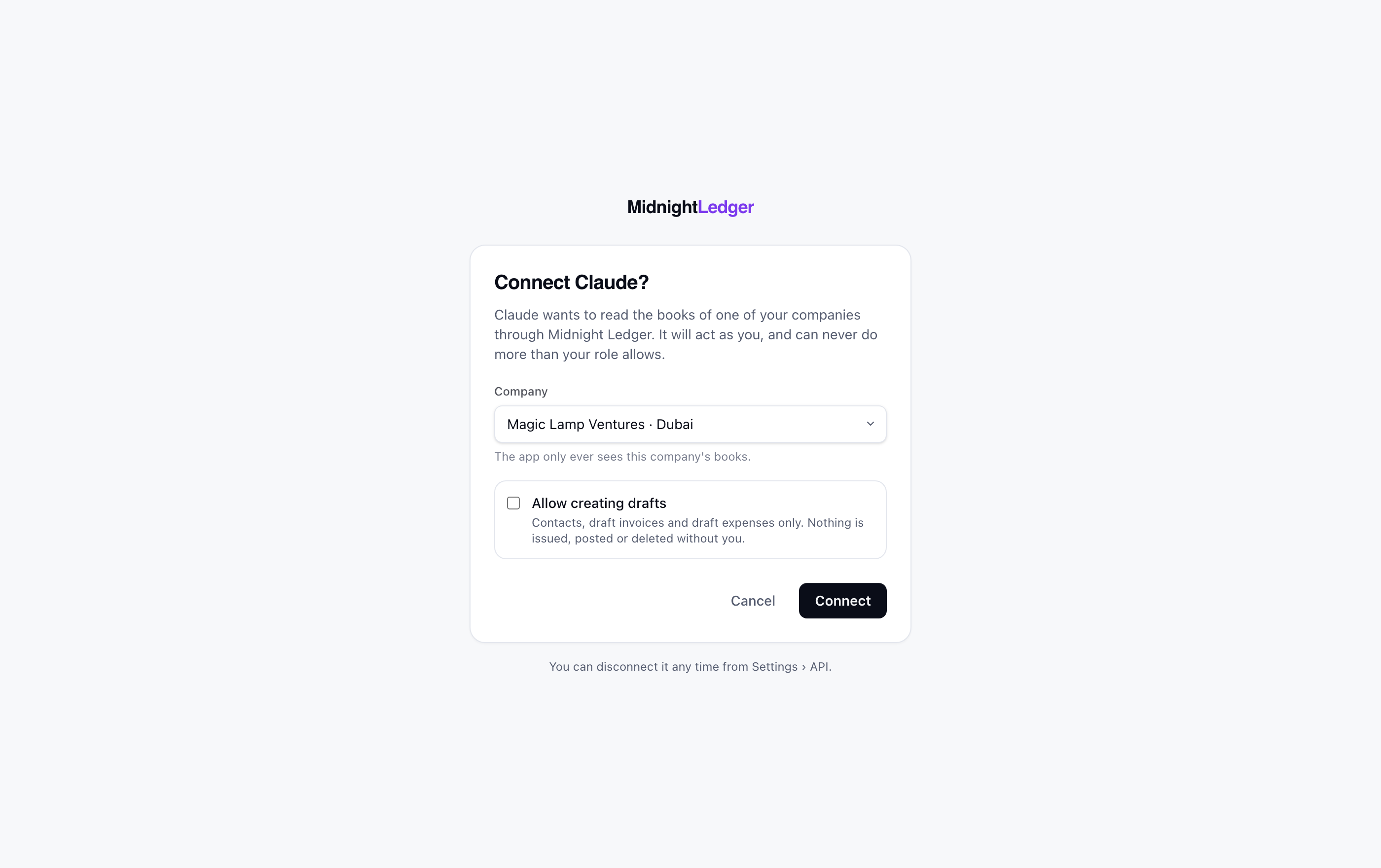
- Pick the company the assistant may see. If you run several companies, connect once per company.
- Tick Allow creating drafts if you want it to draft invoices and bills for you. Leave it unticked for read-only.
- Click Connect. You are sent back to Claude, and the connector is ready. Start with "What company am I connected to?" to check.
Connect ChatGPT
ChatGPT follows the same standard. Add a connector (it lives under Settings, in the connectors or apps section depending on your plan), give it the same URL, https://app.midnightledger.ae/mcp, and complete the sign-in when prompted. The company and draft choices are the same.
Claude Code, Cursor and other tools
Developer tools usually take a token rather than a sign-in. Create one under Settings > API in Midnight Ledger (read-only or read and write, with an optional expiry), then add the server with the token as a bearer header. For Claude Code:
| Tool | How to add it |
|---|---|
| Claude Code | claude mcp add --transport http midnight-ledger https://app.midnightledger.ae/mcp --header "Authorization: Bearer YOUR_TOKEN" |
| Cursor, Windsurf, other MCP clients | Add an HTTP (streamable) MCP server with the URL above and an Authorization: Bearer YOUR_TOKEN header. |
| Your own scripts | Use the REST API at https://app.midnightledger.ae/api/v1 with the same token. The reference is at https://app.midnightledger.ae/docs/api. |
Who can connect, and what they see
A connected assistant acts as the person who signed in, and can never do more than their role allows. Owners and members can allow drafts; a viewer seat is read-only whatever box is ticked. A teammate who is removed from the company loses connector access at the same moment. Access tokens are short-lived and refresh silently, so you sign in once and stay connected until you disconnect.
Disconnecting
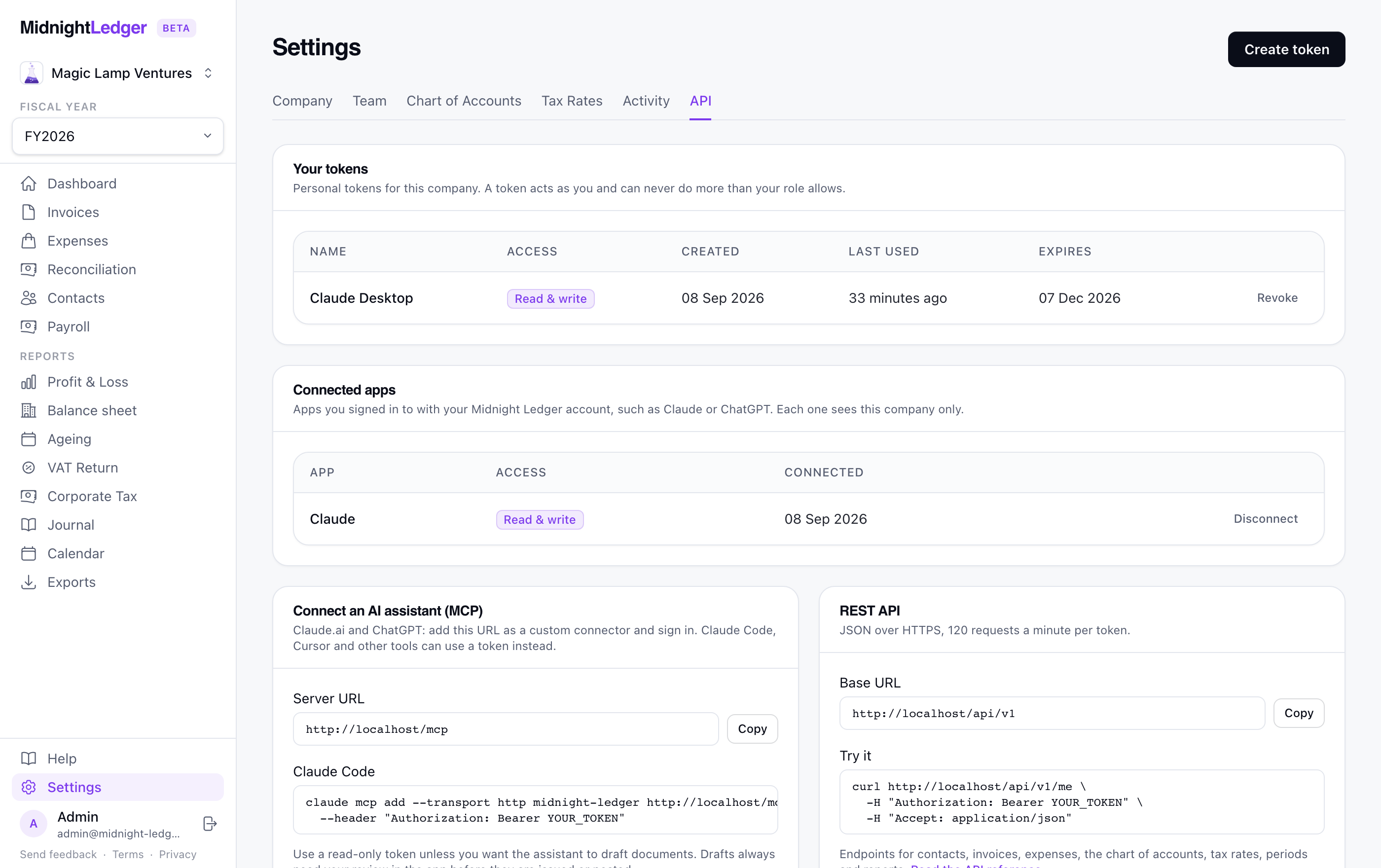
Go to Settings > API in Midnight Ledger. Connected apps are listed with the company and access they were granted; click Disconnect to revoke. Personal tokens are listed above them and can be revoked the same way. You can also remove the connector on the assistant side, but revoking in Midnight Ledger is what actually ends its access.
Frequently asked questions
Does the assistant see all my companies?
No. Each connection is bound to one company, chosen on the consent screen. Connect again to add another.
Can it issue an invoice if I ask it to?
No. It can draft one. Issuing, which assigns the sequential number and posts to the ledger, happens in the app when you click Issue.
Is my data sent to the AI company?
When you ask a question, the figures needed to answer it are passed to the assistant you connected, in the same way as pasting them into the chat. Midnight Ledger itself does not send your books anywhere else. Disconnect at any time from Settings > API.
Is this included in the free plan?
Yes. The connector and the REST API are on every plan, free included, with no extra charge. See the pricing page for what each plan covers.
This guide is general information for UAE small businesses, not tax or legal advice. Rates, thresholds and deadlines are checked against Federal Tax Authority and Ministry of Finance publications on the date above, but the rules change. Confirm anything that matters with the FTA or a registered tax agent.